Archive for the ‘Open Source Software’ Category

Microsoft Azure is Getting Very Close

Tuesday, May 5th, 2015

GoogleAppEngine.jpg

This morning I was reading about some recent additions to Microsoft Azure and so I decided to give it a look-see about what it would be like deploying some things I've been noodling on to Azure. What I found was really pretty nice. Almost.

Azure is getting built out as a series of services that you can add on - not unlike Google's App Engine, and Heroku - but in the case of the first two, they are all owned and operated by the parent companies, where as Heroku allows other companies to offer services to customers. What's different with Azure and Google is that they are about hosting more than a web service or app - Azure now has Batch Processing, Hadoop, Hive, Storm, and a host of other services that can all be brought to bear at the problem you are trying to solve.

This is very nice because Azure also has all the nice monitoring tools like NewRelic, as they own it all, so it's easy to see what's happening, and what you might need to do next. Very slick. They even have Machine Learning as an add-on with code you can write in R and Python. Not my favorite languages, but I get that these are the most popular for the platform, so I'm willing to go with it for now.

In all, I was very impressed with Azure - until I got to the technical details. Then I kinda felt a little cheated. Azure is (understandably) written to use Windows Servers as the back-end first. I can believe they might have linux in the plans, but it's kinda tough to work with Windows Servers underneath if you're writing batch jobs. After all, you need to know what you're writing on - and in the case of clojure, that's the JVM, and while the JVM runs on Windows Server, it's not anything I can reproduce easily.

That's not to say Azure is out of the running. Google App Engine can do many of the same things, but doesn't have the breath and depth of the monitoring - or the additional services like Hadoop and Storm. Sure, you can get machines from Google and put Hadoop and Storm on them, but that's forcing you to be in the role of administrator, and Azure is trying to take you out of that role - on purpose.

Google is giving you a little more choice on the lower levels of the stack, but isn't supporting you as well from a platform point of view. If I were going to make a relatively complex system, and didn't want to mess with the administration - because the performance wasn't that big a deal, and the cost of managed services wasn't too much, then I might really pick Azure.

But that's a lot of "ifs". Most of the times I'm going to know exactly what I need, and for those cases, Heroku is far more likely to be the choice.

Atom 0.194.0 is Getting a Lot Better

Thursday, April 30th, 2015

Atom Editor

With all the brew-ha-ha about GitHub's Electron and Atom editors, I wanted to give Atom another look. What I found was that it's amazingly close to an editor that I could use on a daily basis - moving Sublime Text out of the way.

They have solved the "re-opening with old files" issue - that was huge. They have gotten to the point that it even matches the command keys of Sublime Text. It's close.

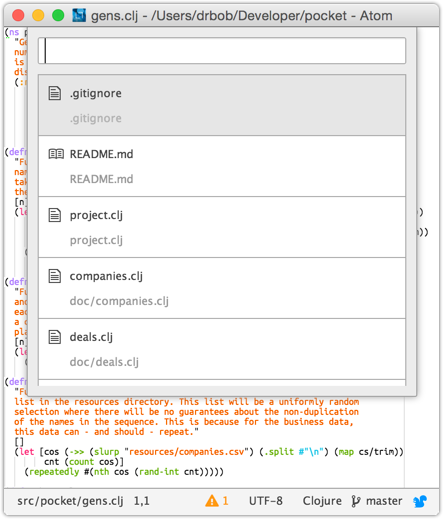
There are a few things that are annoying... the command palette on the default Atom Light UI is too wide for my 80-column windows, and I can't for the life of me figure out what the CSS is to make it more narrow - like 90% of the display width. Fix that, and I might think about it.

OK... this is cool... get into the developer mode:

  $ atom --dev

and then you can get the standard WebKit Inspector for all the components. Then it's just a matter of making the element visible, inspecting it, seeing what's the dimension settings, and then fixing it.

In Atom -> Open Your Stylesheet, you can then add this little snippet:

  atom-panel.modal, .overlay {
    width: 90%;
    max-width: 500px;
    margin-left: 0;
    transform: translate(-50%, 0);
  }

and then the pop-up modal windows will be 90% of the width, and centered. Now it'd be nice to have this be limited to 500px, but I'll work on that next. For now, it's pretty close to being usable. I'll have to give it a go.

UPDATE: by adding the max-width and the transform tags, as well as setting the default margin-left, I can get it to be 90% and centered, or up to 500px and centered. Very nice!

connect bar

Moved to JDK 8 for Clojure Work

Friday, April 24th, 2015

java-logo-thumb.png

It had to happen... JDK 7 is end-of-life by Oracle, and while I imagine that this is not what is really going to happen to all the JDK 7 code out in the wild, it's enough of a pressure that it's time to move off it and onto JDK 8 for real.

I've got a nice switcher tool for the active version of the JDK for each shell, and I just switched it to 1.8, and restarted the REPL and web server to pick up the changes. It's not a ton of work, but it needed to be done, and I need to stay on JDK 8 moving forward.

It's funny... in writing this post, I realized that I can remember when JDK 1.5 was "new" and untested... and 1.6... and 1.7... it's just how things go. Marching onward.

Upgrading Postgres 9.3.4 to 9.4.1 Using Homebrew

Monday, April 20th, 2015

PostgreSQL.jpg

This morning I didn't have a lot going on, and I decided to upgrade my laptop from Posgres 9.3.4 to 9.4.1 as there are a few little things in 9.4 that are nice, and I've got 9.4 on my work laptop, and I figured this would be an easy upgrade - like super easy... I was mistaken.

The rules about automatic upgrades for Postgres is a bug release version change. I thought it was a minor release. So I was expecting to simply shut down the server, upgrade the packages with Homebrew, and then start it back up. The code would detect that it was the next minor version, and automatically update the data. Sadly, that's not the case. It's a big upgrade, and that means that I might as well do a complete dump/load.

Sadly, I didn't do a dump, so I'd have to live with an older version. Not a tragedy, but annoying when I'm in the middle of the upgrade process only to learn that it's not going to work. So it goes...

So here's what I had to do - in the right order to get things working. Not bad, but it's basically the instructions for a dump/load, so I'll assume we know this going in.

First, create a complete dump of the database. Assuming that all these things are installed on Mac OS X, and using Homebrew, the paths are not important - they are all fixed with Homebrew, anyway.

  $ pg_dumpall > dump_file

Next, shut down the running server, update Homebrew, and then upgrade postgres within Homebrew. Just to be safe, let's re-link the launchctl file because in this case, it has changed, and better safe than sorry.

  $ launchctl unload ~/Library/LaunchAgents/homebrew.mxcl.postgresql.plist
 
  $ brew update
 
  $ brew upgrade postgresql
  $ ln -sfv /usr/local/opt/postgresql/*.plist ~/Library/LaunchAgents

At this point I need to move the old database data to the side, and then initialize the database with the new codebase. Once that's done, we can then restart it with the re-linked launchctl file.

  $ cd /usr/local/var
  $ mv postgres postgres.old
 
  $ initdb -D /usr/local/var/postgres
 
  $ launchctl load ~/Library/LaunchAgents/homebrew.mxcl.postgresql.plist

Finally, we need to load up the entire database from the dump file we made in the first step.

  $ psql -d postgres -f /path/to/dump_file

Check and make sure that everything looks OK and then you can easily remove the old database directory:

  $ rm -rf /usr/local/var/postgres.old

That's it.

Adium 1.5.11b2r5922 is Out

Monday, April 20th, 2015

Adium.jpg

This morning I checked on Adium, and thankfully, the maintainers have released a new build - 5922, which is fixing some things I'm sure are important, but the big thing I'm looking for (most likely in vain) is connectivity to Hotmail IM again. It's now being called MSN Live, and even that is supposedly going away in favor of Skype - also owned by Microsoft.

And I'm told that the libpurple changes for Hotmail IM are in and are related to a usage key - like so many authentication schemes are, but that the Adium guys haven't updated the code to use the latest libpurple and until they do, it's going to be dead.

Maybe this doesn't matter... Microsoft bought Hotmail and Skype, and they are free to shut down whatever they way - it's their property now, and it's all up to them. It's just sad that they bought it for it's visibility in the market, and then they let it deteriorate to the point that it's name is trashed, and then they can drop it. It's kinda predatory, if you think about it... but no one forced Hotmail to take the money. It's just business.

Anyway... I'm hoping it gets fixed, or that a really great IM tool comes up. If not, I'll have to get the code and figure it out on my own as I really like this tool.

Interesting Tweet about Ruby Development

Thursday, April 16th, 2015

This morning an old co-worker of mine retweeted this very interesting tweet about Ruby development:

It's true, and I think it's one of the reasons I liked moving from C++ to Ruby - the OO was familiar, and the tools and Convention over Configuration made it nice and easy to get things done - and fast.

But then the reality set in. It was always going to be like this. That's when I realized I don't like big cities. Clojure is the way I think with writing code now, and it's the cleanest way I know to write with simplicity.

Acknowledge truth when you hear it. Amen.

Interesting Problem with Google AdWords API

Wednesday, April 15th, 2015

AdWords

I was working on stripping out a little bit of code from a project at The Shop today, and when I stripped out the library I had made, I got the following error when trying to start the REPL:

  $ lein repl
  Exception in thread "main" java.lang.NoClassDefFoundError:
  clojure/tools/logging/impl/LoggerFactory, compiling:
  (/private/var/folders/ct/jhkds06j26v1lq2t40jx4cndl_629q/T/
  form-init4416651774354867948.clj:1:124)
      at clojure.lang.Compiler.load(Compiler.java:7142)
      at clojure.lang.Compiler.loadFile(Compiler.java:7086)
      at clojure.main$load_script.invoke(main.clj:274)
      at clojure.main$init_opt.invoke(main.clj:279)
      at clojure.main$initialize.invoke(main.clj:307)
      at clojure.main$null_opt.invoke(main.clj:342)
      at clojure.main$main.doInvoke(main.clj:420)

And if I put the library in the project.clj, I don't get this error, but if I take it out, I get this error. And I needed to take it out.

When I did a lien reps :tree to see what overlaps there might be in the libraries, I found a few in the Google AdWords libraries. Easily enough, I took them out, and forced the right version with a simple:

  ;; AdWords Java API
  [commons-lang "2.6"]
  [com.google.api-ads/ads-lib "1.38.0" :exclusions [commons-lang
                                                    org.slf4j/slf4j-api]]
  [com.google.api-ads/adwords-axis "1.38.0" :exclusions [commons-lang
                                                         org.slf4j/slf4j-api]]

because the conflict was in the Google jars and both 2.5 and 2.6 of commons-lang were being used. Simply exclude them both, reference 2.6 first, and that should take care of it.

But it didn't.

So I took to the Google and found that someone had solved this by putting the class in the :apt section of the project.clj file. So with that, I tried:

  :aot [clojure.tools.logging.impl bartender.main]

and then things started working just fine again.

I'm guessing that by building the uberjar for the other library, it did this compilation, so that it wasn't necessary for this project. Take it out, and we have a problem. Force the compile first, and it's all good.

Glad I figured that out.

Colorized Leiningen REPL Plugin

Thursday, April 9th, 2015

Clojure.jpg

Today has been a day for colorization, and while I was at it, I decided to see what I could find that did this for Leiningen's REPL. What I found was simply too cool to believe.

There'a a GitHub project called Ultra - and it's a plugin for Leiningen that colorized the return values from the REPL so that they are a lot easier to read. Keywords, strings, numbers, maps... all are a lot easier to read with this plugin. And installing it was easy.

First, I needed to update to the latest Leiningen - and since I'm using the one in Homebrew, that's just:

  $ brew upgrade leiningen

and let it finish. This brought me to version 2.5.1.

Now just add to my ~/.lein/profiles.clj the user section:

  {
   :user {:plugins [[venantius/ultra "0.3.3"]]
          :ultra {:color-scheme :solarized_dark}}
  }

and then restart the REPL:

  $ lein repl

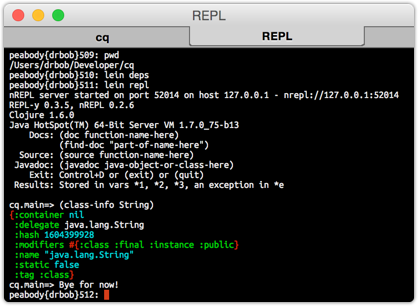
All the dependencies will be downloaded, and then you'll see something really cool like:

connect bar

And this is going to make it all so much easier to work in the REPL. I remember going from a black-and-white editor to a colorized editor and it was as if the world of coding had changed. No longer did I have to stare intently at the code to discern it's meaning, the color told me what was important, and what wasn't. It was just amazing to my productivity.

I'm hoping I get even a fraction of that boost using these new colorization tools for log4j files and the REPL. How exciting!

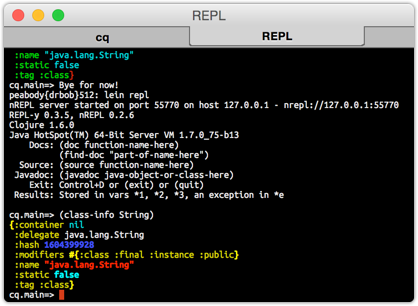
UPDATE: I played around with the colors to make it look a little more like the clojure syntax file for Vim:

better colors

where the new ~/.lein/profiles.clj file looks like:

  {
   :user {:plugins [[venantius/ultra "0.3.3"]]
          :ultra {:color-scheme {:delimiter [:bold :yellow]
                                 :tag [:bold :yellow]
                                 :nil [:cyan]
                                 :boolean [:bold :cyan]
                                 :number [:bold :blue]
                                 :string [:bold :red]
                                 :character [:cyan]
                                 :keyword [:yellow]
                                 :symbol nil
                                 :function-symbol [:bold :blue]
                                 :class-delimiter [:blue]
                                 :class-name nil
                                 :exception nil}}}
  }

I'm not completely happy with these colors, but they are about as good as I'm likely to get with the ANSI color selections at my disposal. And hey... let's not forget... it could be a lot worse! 🙂

[11/20/2018] UPDATE: I've gone back and updated to the latest version of the plugin, and updated the colors for something that's much more interesting to me. The plugin is now specified as:

  {
   :user {:plugins [[venantius/ultra "0.5.2"]]
          :ultra {:color-scheme {:delimiter [:bold :yellow]
                                 :tag [:bold :yellow]
                                 :nil [:cyan]
                                 :boolean [:bold :cyan]
                                 :number [:bold :green]
                                 :string [:bold :red]
                                 :character [:cyan]
                                 :keyword [:yellow]
                                 :symbol [:bold :magenta]
                                 :function-symbol [:bold :blue]
                                 :class-delimiter [:blue]
                                 :class-name [:green]
                                 :exception [:bold :red]}}}
  }

which includes the new colors for the symbol, number, class name, and exception. I was never a fan of the bold blue for numbers, because on a dark background, it was way too hard to read. Now it's just great. Much improved.

Homebrew Really is an Amazing Resource

Thursday, April 9th, 2015

Homebrew

I have been doing a bit of updating in the last 24 hours, which includes getting the latest Apple compilers and support tools - git 2.3.2, even (nice!)... but I've also been checking with Homebrew for the grc command, and updating it based on the new compilers, etc. from Apple. And it just hit me (again), that a tool like Homebrew makes installation of hundreds of Open Source tools so incredibly easy. It's just almost impossible to think that it's necessary to compile many programs from source on a Mac these days.

Lots of great software is in Homebrew - with sections for Science and all kinds of things. Just an amazing community resource. Amazingly all built on Ruby and git. What a way to build something great.

Colorized Tailed Log4j Files

Thursday, April 9th, 2015

log4j.jpg

I've been looking for something to do a decent job of colorizing the output of tail -f for the log files I watch. Nothing really amazing - just something that will highlight the different levels of the log4j file, and maybe something to pick out IP addresses, etc. Nothing fancy. But what it needs to be is simple.

I don't want to have a tool that takes over the tail command - I still want to be able to scroll up on the terminal and see what was there. I don't want something that's got all the search features, or sorting, or filtering... that's all nice, but I have all the other unix tools for those, and that's how I think. No, what I need is a simple, streaming, colorizer of the log4j stream, and then that's it.

After doing a considerable (for me, for this) digging, it looks like a little app called grc is just the thing I need. The source site is here, but there's a fork of the code on GitHub, and given that the savba.sk domain isn't responding this morning, it's nice to have the GitHub version available.

Home-brew has it as well, and so installing it is pretty simple:

  $ brew install grc

and then the info on grace in Homebrew says that it's simple to start colorizing your Bash scripts by simply adding a config file to your ~/.bashrc. But for me, the configuration is a little more complex.

After reading the README at the GitHub fork, it was clear that I needed to make two files, and put them in a new ~/.grc directory: grc.conf for the general configuration of the tool, and conf.log4j for the colorization rules for the log4j files. The contents of the grc.conf file is pretty simple, and just tells grc what config file to use for what source files:

  # log4j files
  \b\w+\b.*log\b
  conf.log4j

the first line is the regex for the name of the file, and the second line is config file to use. Speaking of which, the conf.log4j was created to look like:

  # From http://fahdshariff.blogspot.ca/2011/04/
  #           highlighting-command-output-with.html
  # this configuration file is suitable for displaying log files
  #errors
  regexp=^.*(ERROR|Error|Exception).*$
  colours=bold red
  ======
  #stack trace
  regexp=^\s+at [^:]*:\d*\)$
  colours=red
  ======
  regexp=^.*(FATAL|Fatal).*$
  colours=on_red
  ======
  regexp=^.*(WARNING|Warning).*$
  colours=bold yellow
  ======
  regexp=^.*(DEBUG|Debug).*$
  colours=bold black
  ======
  # this is a time
  regexp=[^\d]*\d\d:\d\d:\d\d[\.,]{0,1}\d{0,1}\d{0,1}\d{0,1}
  colours=bold blue
  count=once
  ======
  # ip number
  regexp=\d{1,3}\.\d{1,3}\.\d{1,3}\.\d{1,3}
  colours=bold magenta
  count=more

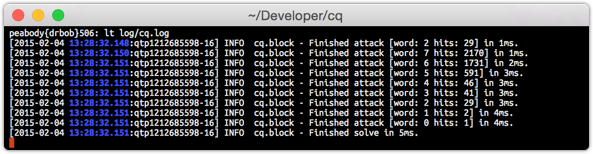
At this point, I should be able to say:

  $ grc tail -f log/cw.log

and grace would see the log in the filename and pick the right config file and then colorize the output of the tail command. To make this even easier, I added a simple alias in my ~/.bashrc:

  alias lt="grc tail -f"

where, to me, the lt stands for Log Tail, and that's so easy for me to remember.

Now if I can just get that site to show up, and download the code. I should be ready to go. Fingers crossed...

UPDATE: I was able to download grc, and sure enough it's working like a champ!

connect bar