One thing that I didn't yet have a handle on with LightTable is how to get this to act as my REPL - for an existing project. Simple one-file projects, or tests were easy, but I wanted to have a REPL that was also an editor - and I was clueless how to get that working.
So I decided to dig in and figure it out.
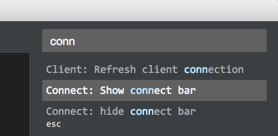
Turns out, it's really pretty easy. First, you have to start up LightTable, and then open up the command list and search for 'connect'. What you're going to do is to create a new connection. So find the 'connect bar':
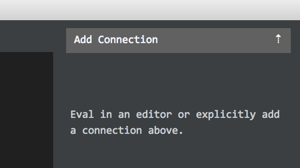
then click on 'Add Connection':
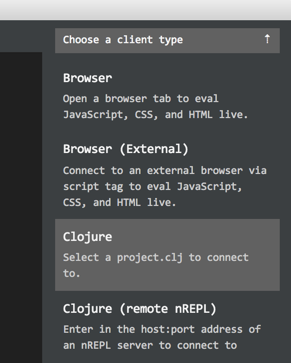
and then select the 'Clojure' item:
and then select the project.clj file and you're in business!
Simply open up an InstaREPL, and you're in a REPL in that project. Very nice!
One of the things that I've really missed in the latest version of Mac OS X is the utility to set the default version of the JDK to use. Well, with all the clojure coding I've been doing, I have typically stuck to JDK 1.7, but recently, the auto-updater from Oracle has them shipping JDK 1.8. Yet this doesn't effect the command-line utilities. This is a pain in the neck.
So first, I got JDK 1.7.0_75 on all my machines - it's going to be the last version of JDK 1.7 that I'll get as it's off the auto-updater. Then I was sure that everything was OK, I also got the complete JDK 1.8.0_40 - which is what the auto-updater downloaded for the JRE, but not the JDK. Yes, annoying.
At that point, I started googling about what to do. Turns out, JAVA_HOME is all I need to worry about. The java, jar, java apps in /usr/bin are all respectful of JAVA_HOME. Then I found this function that I added to my ~/.bashrc:
## Clever trick to leverage the /usr/bin/java commands to take advantage# of the JAVA_HOME environment variable and the /usr/libexec/java_home# executable to change the JDK on-the-fly. This is so easy I'm amazed.#function removeFromPath(){exportPATH=$(echo$PATH|sed-E-e"s;:$1;;"-e"s;$1:?;;")}function setjdk(){if[$#-ne0]; then
removeFromPath '/System/Library/Frameworks/JavaVM.framework/Home/bin'if[-n"${JAVA_HOME+x}"]; then
removeFromPath $JAVA_HOMEfiexportJAVA_HOME=`/usr/libexec/java_home -v $@`# export PATH=$JAVA_HOME/bin:$PATHfi}
setjdk 1.7
At this point, I saw that the key command was /usr/libexec/java_home, and it had all the answeres I needed. I didn't need to update my PATH - just JAVA_HOME. I also could verify that I had all the versions of Java I needed:
$ /usr/libexec/java_home -V
Matching Java Virtual Machines (7):
1.8.0_40, x86_64: "Java SE 8"/Library/Java/JavaVirtualMachines/jdk1.8.0_40.jdk/
Contents/Home
1.7.0_75, x86_64: "Java SE 7"/Library/Java/JavaVirtualMachines/jdk1.7.0_75.jdk/
Contents/Home
1.7.0_51, x86_64: "Java SE 7"/Library/Java/JavaVirtualMachines/jdk1.7.0_51.jdk/
Contents/Home
1.7.0_45, x86_64: "Java SE 7"/Library/Java/JavaVirtualMachines/jdk1.7.0_45.jdk/
Contents/Home
1.7.0_13, x86_64: "Java SE 7"/Library/Java/JavaVirtualMachines/jdk1.7.0_13.jdk/
Contents/Home
1.6.0_65-b14-466.1, x86_64: "Java SE 6"/System/Library/Java/JavaVirtualMachines/
1.6.0.jdk/Contents/Home
1.6.0_65-b14-466.1, i386: "Java SE 6"/System/Library/Java/JavaVirtualMachines/
1.6.0.jdk/Contents/Home
And then with a simple command - in the shell of my choice - I can set - and reset the JDK I use. It's very click:
I've got a few projects on Bitbucket, and while it's nice to have an alternative to GitHub's policy on private repos, the Markdown rendering on Bitbucket is really sad. The problem is simple: If I have a repo with images in it, and I want to include them in the README.md, then for GitHub I need to include something like:
and it'll work - but including the HTML, as per the Markdown standard, on Bitbucket is not allowed. They have written that they don't allow any HTML in their Markdown due to safety reasons. But then why does GitHub? Is it just because Bitbucket isn't using as good a parser?
In addition to the lack of HTML, the relative links in the Markdown aren't supported, either. This means that in order to include an image in the README.md, I have to do something like:

this means that the links don't work in local preview mode, and a lot of folks have been asking for more than a year, to have this fixed. Their answers have ranged from "It's a feature", to "It's on the list, with no ETA". Clearly, the company isn't listening to it's users. That's sad.
For Bitbucket, the issue seems to be revenue. They don't seem to feel the need to fix this serious documentation issue, and it can't be all that hard if GitHub has had it from the beginning. The people on the ticket have even quoted (and linked) the Markdown spec as well as how GitHub is doing this - and nothing has changed.
I can appreciate that this is their choice. Mine is to use it only if I have to, and realize that their idea of support is "No, thanks", and accept what is, over any hopes of what might be.
I'm not a fan of OAuth2... not in the least. It's excessively complicated, it requires call-backs, and in general it's no more secure than anything else, it's just more complicated. Add to that there's no really good library for it as the Google folks keep changing things, and you have something that's always going to require hacks... always going to require fixing, and never going go provide a seamless way to authenticate on a remote system.
But that's just an opinion. I have had to make it work at The Shop, and when I finally got it to work, I wasn't about to let this evaporate into the ether... I needed to make a gist of it, and document what I was doing so that I could come back to this and be able to remember it all at a later date.
The State of OAuth2 Clojure Libraries
The first really depressing thing was that there seemed to be no decent OAuth2 libraries for Clojure. And while there seemed to be a lot of forks of the clj-oauth2 library - but many, like the original, were years old - and they didn't work. Not even close. Now I'm not silly enough to think that the spec changed, but I do believe that Google changed things on it's end to make it more secure, and in so doing, broke all the clj-oauth2 work, and it's derivatives.
Still, there is the code I can look at. And some have pulled in the features that are needed, and so it's not impossible to make this thing work... though it's likely to take a lot of time.
The project.clj File
When I was able to get something working, I made a gist of all the important files, so that I could include them here as reference. I also wanted to post the link to the #clojure room in IRC because one of the guys there gave me a hint as to which library to use. He wasn't right, but he was close, and that's all I needed.
The project.clj file has all the versions of the libraries I used:
What I found was that this version of clj-oauth2 had the most complete mapping of the data coming from Google, which included the expires-in time - which I think I still may be able to put to really good use soon. While it didn't have the functions to renew the access-token, it turns out that it's not hard to write, and I pulled that from another fork of the master project.
The server.clj File
OAuth2 still requires that the user go to Google on a redirect, and then the call-back from them is where we get the first bit of the authentication data. I'm not convinced that this is at all necessary, but it's how things are. Given that, we needed to have the server.clj have an endpoint /google that gets redirected to the right place at Google for the user to login and accept the app.
There is also the callback endpoint, and then a few that return the token data, and renew the token. Nothing special, really, but the targets for the OAuth2 are really important, and it's just sad that we have to have them in the first place.
The dcm.clj File
The final piece is really the meat of the problem.
We start off with the Missing Functions in the clj-oauth2 library, and then jump right into the static config for our application. These are all generated by Google, and you can get them from Google when you register your project/client.
We then have the authentication and re-authentication functions, which took an enormous amount of time to get right, but don't look overly complex in the least. Lovely.
Finally, we have a few calls to test that we got the user profile information properly, and that we can make subsequent calls to Google and get the data requested. It's not a lot, but it works, and it proves that things are working up to that point.
In the end, I'm glad I have it all done, and I'll be integrating the Custos Server in as a secret store of the credentials soon. Then I'll be using redis as the back-end and then pulling data from Google and loading it there. All this is a complete, stand-alone, back-end data collector for the ad messaging data for a client from Google.
Every now and then I remember all the work I did in college, and at Auburn University with SPICE and MAGIC. These are tools that I just can't ever forget, and all the time I spent on the terminals in the Terminal Rooms in the EE building... well... yes, let's just say they were some very Good Times. And of course, that was a good 30 years ago. Wow. In the subsequent years, MacSpice is around, and it's got all the models, and all the capabilities that the old SPICE had - plus some amazing plotting.
In fact, I'm sure my retina MacBook Pro is probably more powerful than all the computers the EE Dept. had in 1988, and it shows. I can start with this very simple LPF circuit:
  MacSpice 1 -> source lpf.ckt

  Circuit: Four double-pole, low-pass, LC-filters

  MacSpice 2 -> run
  On line 2:
      vin 1 0 ac 1
      Warning: Source 'vin' has no DC value specified, 0V assumed.
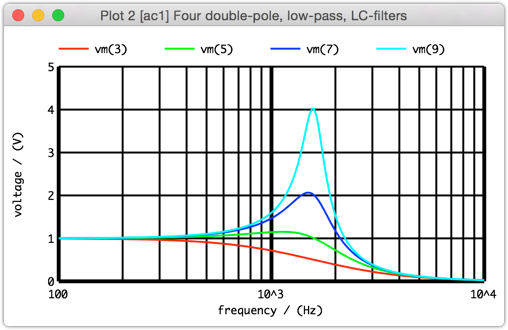
  MacSpice 3 -> plot vm(3) vm(5) vm(7) vm(9)
and we see:
It really is amazing what these tools can do, and they continue to bring a smile to my face. What a treat.
I've been doing a little work on the Clojure CryptoQuip solver by adding a new RESTful endpoint for the server that takes the quip and the clue and solves the puzzle. It's not all that hard, but it's a POST call, as the body of the POST is JSON, and I needed a tool to hit my server to make sure that I had it all working. Enter Postman.
This is just an amazing tool for Chrome. It's a very singular task, and it does an excellent job of making sure that you can make all the calls you need with all the headers and arguments and get back what you need - and even keep a running history of all the calls to re-do should you need them.
Clearly the folks that wrote this knew what they needed and spent quite a bit of time on it. I have yet to find a hole, a bug, or a limitation. It's just good, solid working code. And it's free. Wow. Impressive.
I looked at several of the OS X tools on the App Store, and even on the web and the nice ones were more than $20, and most weren't nearly as nice as Postman. If you need something like this, you need it, and this is as good a tool for the job as you can get.
A while back, just after switching to OS X 10.10 Yosemite, I saw that Yahoo! wasn't at all happy with Adium. It simply wasn't connecting. Thankfully, there was a known fix in the works, and it didn't take long for someone to build a version and post it online. Soon after that, the Adium developers posted a similar update to their Nightly Builds, and I picked that up to be a little safer.
I have to admit that I'm a little surprised that it took so long, but I was willing to let it go - Adium has been a really great Open Source tool for me over the years, and it's certainly possible that they just got caught up in other things, and didn't have time to make the release.
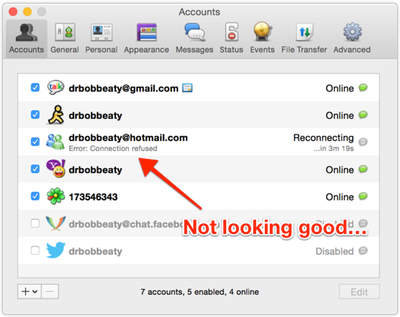
Now we're in a slightly different situation, and there's a problem with MSN Live:
The story is that MSN has changed the accpetable API ids and the one that Adium and libpurple is using is not on the "approved" list. There is another in libpurple now, but the Adium team hasn't picked it up, or hasn't integrated it, or hasn't released it. In any case, it's stalled. Badly.
Now I'm not a big MSN IM user, but it's there, and it's simple to fix, and it's ready to go, so let's get to it, guys. Or let's make it clear that there are no developers to support this, in which case, I'll pick up the mantle, and just do the things that I think need to be done to keep it moving forward.
My fear about this is that the codebase is in horrible shape, and it's hours and hours to figure out anything, and then it's horrible to build, etc. There's also the Colloquy concern - it stopped updating, and then Textual picked up the banner, and I bought that app off the App Store. If someone looks at the sad state of Adium, I see them coming to the same conclusion and making a paid multi-protocol IM client.
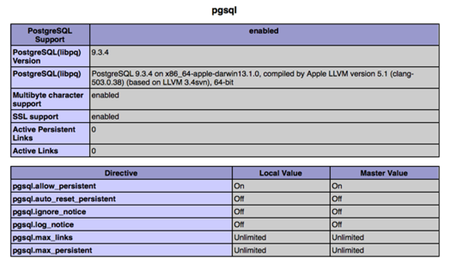
This morning I thought I'd just check on the status of Apache + PHP + Postgres on OS X 10.10 as it was likely that in the update from 10.9, Apple had changed things, and sure enough, they have. But it wasn't all them - Apache has some changes in it as well, so to be fair, getting this all to run is a little more complex than you might imagine, but it's still not all that hard.
Getting PostgreSQL 9.3
As with the previous post I'm using Homebrew and that's made the entire operation a lot smoother. There's no 32-bit/64-bit issue as Homebrew does both, and it builds in on your box, so again, a lovely customized solution with a simple command:
$ brew install postgresql
It even has a nice, simple informational blurb about how to start/stop and upgrade. Very nice. But now that it's on the box, and ready to roll, let's add in the PostgreSQL support to the PHP 5.5.14 that's installed with Mac OS X 10.10.
Activating UserDir in Apache 2.4.9
The first thing I noticed is that the UserDir extension is not enabled by default, so we need to get that going right away. This enables the code to be run from the development directories, and that's a big time-saver. First, we need to enable the UserDir module in Apache, and then make a specific config file for the user in question. Start by editing /etc/apache2/httpd.conf and line 166 needs to be uncommented to read:
and then similarly on line 493 uncomment the line to read:
Include /private/etc/apache2/extra/httpd-userdir.conf
At this point, you need to make sure you have at least one file in the /etc/apache2/users/ directory for each user, like: drbob.conf:
<Directory"/Users/drbob/Sites/">
OptionsFollowSymLinksIndexes MultiViews
AllowOverrideNoneOrderallow,denyAllow from allRequireall granted
</Directory>
where the last line - Require all granted is new as of Apache 2.4, and without it you will get errors like:
  [Thu Dec 18 10:41:32.385093 2014] [authz_core:error] [pid 55994]
    [client fe80::7a31:c1ff:fed2:ca2c:58108] AH01630: client denied by server
    configuration: /Users/drbob/Sites/info.php
Activating PHP in Apache
The mext thing to do is to activate PHP in the supplied Apache 2 with OS X 10.10. This is line 169 in the file - /etc/apache2/httpd.conf and you need to uncomment it to read:
LoadModule php5_module libexec/apache2/libphp5.so
and then add a new file called /etc/apache2/other/php5.conf and have it contain:
which does all the other PHP configuration in a separate file to make upgrades easy.
Building in PostgreSQL 9.3 extra for PHP 5.5.14
At this point we need to get the source code for the exact version of PHP that Apple ships. This is pretty easy by getting the PHP 5.5.14 source from a mirror and unpacking it into a directory. We then just run the following commands:
  $ cd php-5.5.14/ext/pgsql/
  $ phpize
  $ ./configure
  $ make
at the end of this process, you'll have a file: php-5.5.14/ext/pgsql/modules/pgsql.so and that needs to be placed in the right directory and referenced in the php.ini file.
I read with a giggle this article off Slashdot about the problems companies are having making Hadoop actually work in their environment. This is not in the least surprising to me. Hadoop is a nice, distributed, storage environment, but so is a very nice SAN. Both can store a lot of files, and do it very quickly, with redundancy, but one is putting entire computers on each "disk", while the other is allowing the disks to just be... well... disks.
The promise (hype) of Hadoop is that by distributing the computing power like the storage, the map/reduce jobs can be done fast and easily and you get old-style SQL performance with as much online storage as you can muster.
But the truth of the matter is far different than this, as this article in the WSJ attests.
Hadoop is nice, but it's not fast. It's good for lots of storage space, but so is a SAN. It's nice to do small map/reduce jobs, but so is CouchDB. But you can't scale CouchDB to any size you want, either. There will always be limits.
I know folks that are looking at Cassandra, and really like it. It's not as general-purpose as Hadoop, but it's targeted at the problem of massive storage with SQL access. Advocates of Hadoop will say Use Spark - get SQL that way! and that's possible, but then that's not Hadoop, is it?
You can use many different caching schemes to make any storage scheme work faster, but the promise of Hadoop was that you wouldn't need them. That's where it fell over. I have no doubt that Hadoop can do a lot of really good things in a lot of very specialized environments, but it's not the silver bullet worth $2 billion. It's a nice open source map/reduce like CouchDB, but on as many boxes as you want. It's nice... but it's not what people hoped it would be.
Too many distractions in systems development these days. Just too many.
This morning I was looking into yet another Adium problem with MSN Live, and I opened up the Console.app and noticed a lot of messages like this:
  12/18/14 4:08:22.886 AM com.apple.xpc.launchd[1]:
    (homebrew.mxcl.postgresql[52026]) Service exited with abnormal code: 1
and when I tried to check if Postgres was running:
  $ psql -l
  psql: could not connect to server: No such file or directory
          Is the server running locally and accepting
          connections on Unix domain socket "/tmp/.s.PGSQL.5432"?
so it was clear that something was wrong with postgres on my laptop.
To be fair, I haven't really messed with this since going to Yosemite, so I hit DuckDuckGo and it reported this post on StackOverflow, which says that in the Yosemite upgrade, several empty directories were deleted, and all I needed to do was to re-create them and restart postgres.
and then I could see all the databases on the laptop, and the Console.app showed that things were running just fine.
While I understand that postgres is inefficient as it's running all the time, I still love this database, and it's worth the cycles to have it on my development laptop because it scales to the server room so bloody well.