Big Move: Shutting Down Google Chrome

October 8th, 2018

Code Clean Up

This morning, while looking at Google Chrome on my work laptop, and with John Gruber's words ringing in my head:

Man oh man, did Google hit the Mac version of Chrome with the ugly stick or what? Worst looking tabs I’ve ever seen — they look like a rendering bug.

and to be fair, that's what I thought of the changes they put in, yet after working with it for a few weeks I was more accepting of it's new design. But that was just me getting used to it - it wasn't that I was seeing the design factors they were going for.

So this morning, I just decided that on my laptop, I'd stop using it. There was a time that Chrome was a great alternative to IE, yes - on the Mac, and Firefox wasn't really all there, and Safari was still getting going, and if you wanted to have a fast, stable, browser, you went with Chrome. Period.

But those days are no more. Chrome is not a good citizen of the machine - it's got real tracking and security concerns, and in general, I just was getting tired of looking at the app that didn't at all look like a Mac app when I was posting and viewing my blog. So enough. It's over.

I'm using Safari Technology Preview because I like to test what's coming, and while I would not use it for my "main" browser activities, I am more than happy to use it for viewing the blog, and making my football picks with some old friends. Nothing is critical, and everything is OK.

We will see who this goes - I'm betting it'll be just fine, and I'll be happier to not be running a Google app that doesn't look like they wanted to make a native Mac app. That's up to them - and fine if that's what they want to do - I just don't have to like it. Or run it.

Fantastic Postgres Client – Postico

October 5th, 2018

Postico

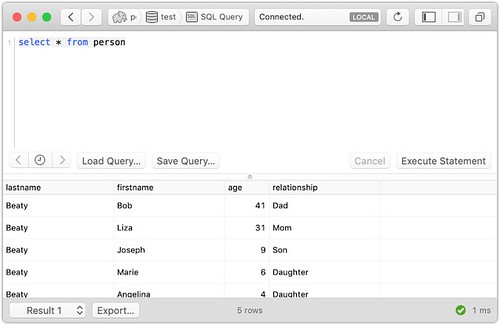
I was updating my macOS 10.14 Mojave install to get Apache + PHP + Postgres working, and I realized that I probably never wrote up this great Postgres client for macOS - Postico. When I saw it, and how complete and efficient the UI was, I knew I had to buy it - just to support more development like this.

Normally, I'm a psql guy because I'm far faster on the command line than I am in a GUI - it's just the number of hours and the fingers are always on the keyboard. Plus, let's face it - the feature set of psql is very impressive - I've got it in scripts, and you can pass in variables for insertion into your scripts... it's just pretty amazing. But still... great design needs to be supported, and this is one that really needs the support.

Postico Results

There are so many things I like about this UI. First, it's efficient - you have a query window, and then a table of results. I wrote something like this many years ago, and I had the same UI - but I stopped there. They didn't, and I'm glad they didn't. They then filled in the window title bar with the connection information and the status of the connection. They even let me know if it's local or remote. Lots of good stuff there at a quick glance.

Then we can look at the footer of the window - we can export this data in a variety of forms, and it lets us know the row count, if the query was successful, and the time required. This is all great stuff, and it doesn't chew up a ton of screen real estate, but it's all there - efficient

There is a lot more to this guy - as a Mac app, you'd expect multiple connections to different databases - and you get that as well. I've never really needed it - but again, I'd just open up several terminal windows and then run psql in each. But it's great to know that they spent the time to get all the details right.

Anyway... maybe I'll use it a lot - someday... but I love supporting great designs, and this is a really good one.

Getting Apache 2.4.34 + PHP 7.1.19 Going on macOS 10.14 Mojave

October 5th, 2018

Yosemite

This morning I thought I'd perform the ritual of getting the old web development tools that I've used in the past going again - this time on macOS 10.14 Mojave. Now I haven't used PHP in ages, but I've still got code and databases for Postgres to use that - so it makes sense to get this all working again, and it's always fun to see how things work out.

Getting PostgreSQL 10.3

Loads of coverage here about Postgres, and it's just so simple to get the latest version from Homebrew:

  $ brew install postgresql

I've even posted how to upgrade from major version differences, so it's easy to get the latest Postgres running on your box, and the tools are just superb.

Activating UserDir in Apache 2.4.34

As in the previous updates, the UserDir extension is not enabled by default, so we need to get that going right away. This enables the code to be run from the development directories, and that's a big time-saver. First, we need to enable the UserDir module in Apache, and then make a specific config file for the user in question. Start by editing /etc/apache2/httpd.conf and line 174 needs to be uncommented to read:

  LoadModule userdir_module libexec/apache2/mod_userdir.so

and then similarly on line 511 uncomment the line to read:

  Include /private/etc/apache2/extra/httpd-userdir.conf

Next, make sure that the file we just included is set up right for including the user
directories. Edit /etc/apache2/extra/httpd-userdir.conf and line 16 needs to be uncommented to read:

  Include /private/etc/apache2/users/*.conf

At this point, you need to make sure you have at least one file in the /etc/apache2/users/ directory for each user, like: drbob.conf:

  <Directory "/Users/drbob/Sites/">
      Options FollowSymLinks Indexes MultiViews ExecCGI
      Require all granted
  </Directory>

where the last line - Require all granted is new as of Apache 2.4, and without it you will get errors like:

  [Thu Dec 18 10:41:32.385093 2014] [authz_core:error] [pid 55994]
    [client fe80::7a31:c1ff:fed2:ca2c:58108] AH01630: client denied by server
    configuration: /Users/drbob/Sites/info.php

Activating PHP in Apache

The mext thing to do is to activate PHP in the supplied Apache 2 with macOS 10.14. This is line 177 in the file - /etc/apache2/httpd.conf and you need to uncomment it to read:

  LoadModule php7_module libexec/apache2/libphp7.so

and then verify a file called /etc/apache2/other/php7.conf exists and contains:

  <IfModule php7_module>
    AddType application/x-httpd-php .php
    AddType application/x-httpd-php-source .phps
 
    <IfModule dir_module>
        DirectoryIndex index.html index.php
    </IfModule>
  </IfModule>

which does all the other PHP configuration in a separate file to make upgrades easy.

Finishing Up

At this point, a simple restart of apache:

  $ sudo apachectl restart

and everything should be in order. Hit a URL that's a static file with the contents:

  <?php
    phpinfo();
  ?>

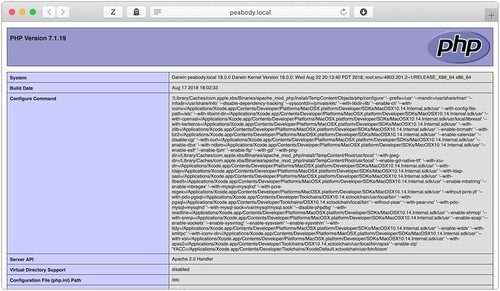
and you should see all the details about the PHP install - including the PostgreSQL section with the version of Postgres indicated:

Apache PHP on Mojave

What's really great is that Apple has included lots of support in the default PHP install:

  • PHP 7.1.19
  • Postgres 9.3.7
  • MySQL 5.0.12
  • SQLite3 7.1.19

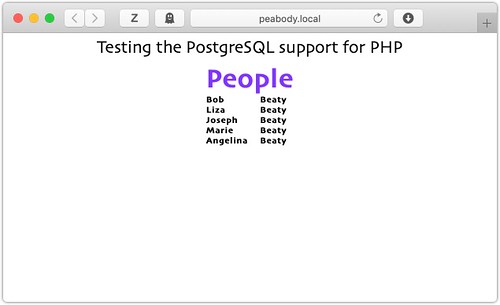
so there's no reason to do anything more to get the kind of support that I used to get. And I get the other databases for free. This is great news! I then run my little test page to make sure the database ocnnection is working:

PHP + Postgres Test

and everything is working exactly as expected!

Updated Homebrew for macOS 10.14 Mojave

October 3rd, 2018

Homebrew

This morning I wanted to make sure that Homebrew was up-to-date on my laptop - now that I'd upgraded it to macOS 10.14 Mojave. In the past, changes to the OS and Xcode almost always meant that I had to update with a simple:

  $ brew update

and off it would go - updating the code for brew as well as the list of new, updated, and deprecated packages. This time, it also pointed out that in the upgrade to Mojave, I think Apple cleared out some empty directories. The update instructed me to:

  $ sudo mkdir -p /usr/local/sbin
  $ sudo chown -R $(whoami) /usr/local/sbin

so that the /usr/local/sbin directory was created, and owned by me. Sounds fair - I don't think I had anything there - and we're good to go, but it's really impressive how they have handled all the package management and versioning. I really like the tools these guys make.

iTerm2 and Mojave Conflicts

October 1st, 2018

iTerm2

This morning I was updating iTerm2 and realized that ~/Library/Images/People was there but it wasn't something I could ls... and I thought Great! Corrupted disk... but then I started digging into the problem and found some interesting things with macOS 10.14 Mojave.

To start, this is what I was seeing:

  peabody{drbob}378: ls
  ls: .: Operation not permitted

and I thought permissions - but it wasn't. I checked the permissions on the directory, and then the ownership, and root wasn't doing any better. This was a bad situation. I had a back-up at home, and I was able to see that it was just this one directory, so maybe it was Mail.app - nope... that wasn't it.

Then I decided to see what the Finder said - and there were all the files! I could make a new directory - People2 and use the Finder to copy all the files to the new directory - and then remove the old People and rename the new one. But the files were invisible on the rename!

OK... this was getting closer - it's the directory name. So let's try Terminal.app - and when I tried to change to ~/Library/Images/People it asked if I wanted to allow Terminal.app to access my Contacts.

Ahh...

This was a simple issue of sandboxing for security. iTerm2 wasn't triggering the request for permissions to that directory, and so the app wasn't allowed to "see" it. Very clever. Sadly, you can't manually add an application to the 'Contacts' in the Security part of System Preferences. Too bad.

For now, I know the problem, and how to work around it - and when iTerm2 gets this fixed, it'll ask, and as I did with Terminal.app, I'll say "OK", and we'll be good to go. Wild.

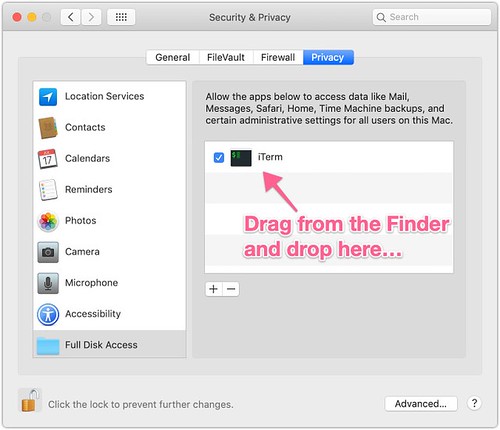
UPDATE: There's a pretty easy fix for this in Mojave and it's in the Security System Preferences - you simply need to drag the iTerm app into the list, and then select the checkbox. Simple. It now has access to all the directories.

Permissions on iTerm2

GraalVM – A Very Interesting Project

September 27th, 2018

GraalVM

I was chatting with a Clojure developer friend this morning, and he mentioned getting the CryptoQuip solver running on the GraalVM and seeing how it performed. I didn't know anything about it, and I decided that if my friend was interested in it, then there's certainly something there, and I should read up on this. I'm very glad I did.

I've seen several attempts at making a Clojure compiler in the past - heck, I've thought about trying it - but each one falls a little short, and only handles a small subset of the complete Java byte codes, and so it's good for little things, but it doesn't really handle big projects that you'd run into in practice. So I started reading, and there is the GraalVM, and the Graal compiler. It's a project from Oracle, and is really about creating a universal VM that can run all kinds of languages - not just JVM-based, which is very interesting, and more than a little ambitious, but more power to them.

They have pages on compiling to native apps to avoid the startup costs of the JVM - which isn't horrible, but for Clojure, what's loaded is a lot more than just the JVM, and it really does make building command-line tools in Clojure hard. But I found another post about a real Clojure example, and it showed that it wasn't all that hard to add a post-processing step after the uberjar, and then you get a native executable that's pretty impressive.

When I did more reading, the big limitation is that code can't hit the class loader and be compiled - makes sense, but in my past one of the really nice libraries that used this to great effect was amazonica and it was really good at handling the AWS details, but I suppose if you're not using AWS, then you're not too bad off.

WHat's for sure is that I'll remember this as it makes Scala, Clojure, and all the JVM languages able to be native code, and that will make Docker images smaller, and everything spin up faster, etc. It even says it does Python, so there's a possibility there.

Very interesting.

Reading Up on CloudKit

September 26th, 2018

CloudKit

After I went through Swift and Xcode, I was looking for something to read, and CloudKit seemed like a really good thing to read - as I know a friend is using it for his app, and it's one of the really nice features that Apple is making available for server-side uses in the iOS and macOS apps. I'm not at all sure when I'll use it, but I really wanted to get to know it so that I can know what it's capable of, and the basic limitations it's got.

To start, it's important to see this as what might be called a very simple database, and it's probably a good idea to take Apple's cue and call them RecordSets. It really is best to think of them as Collections, as it's not really a traditional database at all, but you can mimic a lot of database activity with it. Still - Collections is the best way to think about it.

Next, they have certainly put in a lot of work to make sure app developers have the tools they need to specify these records on the Apple developer web site. It's really impressive, but then again, Apple uses CloudKit a lot - so it makes sense that you make the tools that help you make apps.

What's interesting is that they have a very logical, clear, data access pattern that covers getting just the updated records... or sending a predicate and getting all the records that match that, or paging them as needed to make the app more responsive to the user. What I find very nice about CloudKit is that for thumbnails of the images - they don't do a thing - it's up to you, the app developer, to make those, and put those in the record. That way, you control the style, image quality, etc. of the thumbnail. Very nice.

I Like that they have the batch and single operation interface, and they have really gone all-in on the NSOperation as the tool for doing all this work. If you get used to that, and good at using it you're going to be set with CloudKit. They have subclassed that to have a lot of different operations, and true to NeXT and Apple form, the names are a little strange to me now - having done a lot of functional coding over the last few years - where names are typically a lot shorter, but that's just the way NeXT has always been.

As I was watching the WWDC sessions, and reading the docs, I realized that this could not really be made a lot simpler for the general case of interacting with iCloud, but it sure was a lot more complicated than any one app would really need. I kept thinking about how to simplify this and make it into a library with simpler access patterns. Then I'd realize that it would be restrictive, and so it would only be good for a subset of all use-cases, and again Apple did the right thing, and it's complex because it's a complex system.

Still... I can bet that if I had to use it in an app, I'd have to make a Framework or something to encapsulate the use cases that I was going to be using - just because I'd need to abstract this away to make it simpler to see how the part interacted with one another. But I suppose that another point to consider is that an app isn't about a lot of complexity, and so interacting with CloudKit is probably the most complex thing an app is doing, and so it's not really surprising that this is as complex as it is.

Low down: it's impressive, and full-featured, and I think it's great that Apple made it.

Apache Pulsar is an Interesting Project

September 25th, 2018

Pulsar

I read a tweet this morning about Apache Pulsar achieving top-level project status in the Apache organization. I hadn't heard of it, so I spent a little time reading about it and getting familiar with the differences between it and Storm, Flink, etc. What I found was something that I might actually use in the future.

The important parts are that Pulsar is a message broker with reliable messaging, with storage and fail-over. This makes it way better than many other systems, but it goes a lot further than that. Because it's Apache, it's using ZooKeeper, but it's also using BookKeeper for the message storage - which is an interesting twist.

It's scalable up to a million topics... is meant to sync servers by geo-location, and all the goodies you'd expect from something like Cassandra or the like. Lost of resilience. Turns out, it was the message broker for Yahoo, and has been open sourced. It's low-latency, and meant to be server-to-server in the datacenter, even if they are separated by continents. So it's battle-tested. And all this makes it a useful project because there are lots of times I can imagine needing a better broker than SQS.

But what makes it even nicer is that it has all the Lambda capabilities that AWS has as well. So now you can add in the streaming capabilities of Storm in the messaging system - as opposed to having a streaming system talk to Kafka as a source and sink. This is a different take on the problem, but one of the problems I had with Storm was the scaling of the nodes - it was hard to get them to not back-up. If this is a message broker, then we have a lot more flexibility on the processing time, and every hand-off is to a queue/topic. That's good news.

I'm not sure if/when I'll need to have something like this, but I'm very happy to see that they have it, and it's gotten to a point that it looks pretty stable. Good news!

MacOS 10.14 – Mojave Arrives!

September 25th, 2018

Apple Computers

Yesterday, around noon, I guess, macOS Mojave was released, and signified the end of a very exciting week for Apple. First it was iOS 12, and Xcode 10, then the new iPhones, then macOS Mojave. What a week!

I'm not going to use Dark Mode - it's just too hard for me to read the small text, but that's OK. I like that Apple is trying new things, and it's getting people excited about the UI again, which is always good. I do like a few of the UI changes that they added - there is now a clear distinction between the apps in the Dock, and those that are permanent members of the Dock. Nice. I also like that Safari 12 is getting more strict with the security and ad blocking. It's an entirely different world out there now - as opposed to 10 yrs ago, and I like that Safari, and Apple, feel that security and privacy is a fundamental human right.

There are tons of things under the covers, I'm sure. I've read about several, and as Xcode 10 was likely the build system, I'm guessing that there are nice performance boosts in several spots as well. All very cool stuff.

There are No Guarantees

September 25th, 2018

PHB.gif

Late yesterday, a friend of mine was laid off. It happens, but he was on a new project at a new company... probably hadn't been there three months, and the project was cancelled. He was the only US-based employee for the company, and so that was it. No new project. No other opportunity in the company. Gone.

While a part of me understands this logic - you hire for a project, and if it is cancelled, then you don't need the people you hired for it, and so they can go. This makes perfect sense to me as a business owner. There is no fat. But at the same time, when the company has more than 50, or so, employees, and you find a good one, you have to wonder why they didn't plan for the possibility, and find a place for a good person to do good work?

I'll never know why they didn't, and how close they were to pulling the plug when he hired on, but it seems like the relationship between tech worker and employer is at an all-time low. The workers expect the world from the employer - tons of money, ping-pong, meals, stock, etc. and in return, they seem to want to work 4 hrs/day and be treated like royalty. Employers want to hire who they have to, and then drop them when they don't need them.

I suppose it's only fair, but it's sad at the same time. We're getting more like nature where the strong survive and thrive, and the weak, or unlucky, are eaten. Kinda harsh.