iTerm2 and Mojave Conflicts
Monday, October 1st, 2018
This morning I was updating iTerm2 and realized that ~/Library/Images/People was there but it wasn't something I could ls... and I thought Great! Corrupted disk... but then I started digging into the problem and found some interesting things with macOS 10.14 Mojave.
To start, this is what I was seeing:
  peabody{drbob}378: ls
  ls: .: Operation not permitted
and I thought permissions - but it wasn't. I checked the permissions on the directory, and then the ownership, and root wasn't doing any better. This was a bad situation. I had a back-up at home, and I was able to see that it was just this one directory, so maybe it was Mail.app - nope... that wasn't it.
Then I decided to see what the Finder said - and there were all the files! I could make a new directory - People2 and use the Finder to copy all the files to the new directory - and then remove the old People and rename the new one. But the files were invisible on the rename!
OK... this was getting closer - it's the directory name. So let's try Terminal.app - and when I tried to change to ~/Library/Images/People it asked if I wanted to allow Terminal.app to access my Contacts.
Ahh...
This was a simple issue of sandboxing for security. iTerm2 wasn't triggering the request for permissions to that directory, and so the app wasn't allowed to "see" it. Very clever. Sadly, you can't manually add an application to the 'Contacts' in the Security part of System Preferences. Too bad.
For now, I know the problem, and how to work around it - and when iTerm2 gets this fixed, it'll ask, and as I did with Terminal.app, I'll say "OK", and we'll be good to go. Wild.
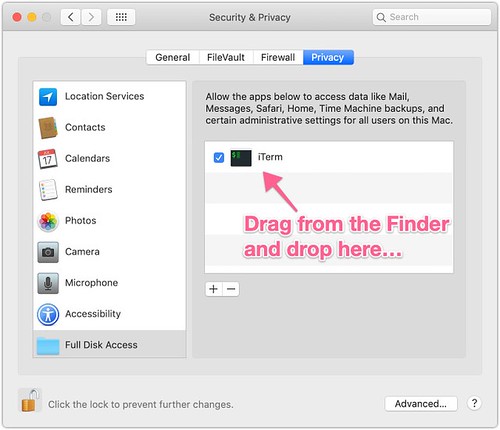
UPDATE: There's a pretty easy fix for this in Mojave and it's in the Security System Preferences - you simply need to drag the iTerm app into the list, and then select the checkbox. Simple. It now has access to all the directories.





 In the work I'm doing, I've got a service that chooses to return a group of files in a standard Zip file format, and then I can easily store it in S3 using
  I'm a huge fan of clj-time - it's made so many of the time-related tasks so much simpler. But as is often the case, there are many applications for time that don't really fall into the highly-reusable category. So I don't blame them for not putting this into clj-time, but we needed to find the start of the year, start of the month, and start of the quarter.