Archive for the ‘Everything Else’ Category

Handbrake 0.9.3 is Out!

Monday, November 24th, 2008

HandBrake.jpg

HandBrake is without a doubt the easiest way to get a DVD onto my iPod Touch (and iTunes). You put in the DVD, it gets all the structural information off the DVD and you can then optimize the destination format and type in the chapter titles and then rip the DVD. It's smooth, fast, and effortless. After it's ripped, you just import it into iTunes, add the album artwork and the info for the title and you're ready to go.

VLC.jpg

The news is that they have released 0.9.3 and removed the DVD decryption from HandBrake. Instead, they look for VLC's libraries in the Applications directory, and use that. You need to have VLC 0.9.x or better to have this work, and because I had the older 0.8.5 I had to update it as well.

Interestingly, the latest VLC is a lot less invasive than the previous version. I use Perian for most of the content viewing, but it's nice to have it be less intrusive, and I had to get it to make HandBrake work. It'll be interesting to see what's different about the experience of ripping.

MacVim Snapshot 38 is Out, and Moving Fast

Saturday, November 22nd, 2008

MacVim.jpg

The guys working on MacVim have released an update to the project - Snapshot 38. There have been some annoying error messages related to the forking of the processes for tabs, and the guys have been hard at work getting to the bottom of them. Based on the comments in the mailing list, I think Snapshot 38 still has some issues, but the next snapshot will have them all cleared up. Excellent news for the coming days.

Still, it's nearly the perfect implementation of Vim. The only thing it's lacking is the beautiful temporary zoom on a find that Safari and SubEthaEdit do. BBEdit still doesn't and it's not strictly necessary, but it is beautiful to watch.

Upgraded NetGear Router to 1.0.29NA

Friday, November 21st, 2008

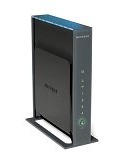
NetgearWNR3500.jpg

This evening, I took the time to update my NetGear WNR3500 GigaBit Router to the latest firmware 1.0.29NA. I'm not sure if there are a lot of significant updates - they had no release notes, but given that this the the portal to the internet for all the machines in my house, it's a good thing to keep it up to date and make sure it's not been compromised.

It's odd, but when I upgrade the router, it always seems like I have to power-cycle it to get things working again. I'm not worried about it. I know the upgrade worked, and I only do this every few months, so it's no big deal, but you'd think they had that put into the restart properly after the upgrade. Odd...

iPod Touch 2.2 is on iTunes

Friday, November 21st, 2008

iPodTouch.jpg

After I updated iTunes this morning I synced all the updated iPod Touch apps, and then found that version 2.2 of the firmware for the Touch was out. I had to update. Safari is updated as is Mail, there are WiFi improvements, and the Home button is really home now, and the general stability and security fixes.

Nice to get, and I have to say I don't miss not having a phone in it. It's perfect just as it is.

Camino 1.6.5 is Out

Friday, November 21st, 2008

Camino.jpg

The Mozilla Group has released Camino 1.6.5 today with the standard stability and security fixes as well as the latest Gecko rendering engine. They biggest annoyance to me is the buttons on the web sites. Why is it that Camino seems not to be able to do those right?

I understand their desire to be a Mac-like browser, but then they need to be smarter about what they do for the rendering of the buttons. I'm sure it's not high on the list of bugs to fix, but it's a style point that makes it easy for me to place it third out of three for browsers on OS X.

Software Update has iTunes 8.0.2

Friday, November 21st, 2008

iTunes.jpg

This morning I noticed that Software Update had an update for iTunes to take it to 8.0.2. Seems the improvements were in the integration with VoiceOver, and a problem with third-party MP3 files (Amazon store?), as well as the standard stability and security fixes.

Nothing much changed, but it was nice to see they were moving forward with updates in light of Snow Leopard's release in a few months.

Fission 1.6.1 Fixes Two Nasty Bugs

Wednesday, November 19th, 2008

Fission.png

The cats at Rogue Amoeba have fixed two "nasty bugs", as they called them, in Fission and released version 1.6.1 for general consumption. I'm a little surprised that they didn't elaborate, but maybe they were something they'd rather not hear about again and again in the indie Mac developer community (You did What?).

I hadn't hit anything major with Fission, but then again, I'm not making/editing podcasts with it either.

UPDATE: they did say what the problems were:

  • Fixed a rare crash that could occur after intensive editing
  • Fixed a drawing-related crash on Tiger when using the I and O keys to create a selection

VoodooPad (Pro) 4.0 is Out!

Tuesday, November 18th, 2008

VoodooPad.jpg

I've been using Flying Meat's VoodooPad (Pro) for a while now, taking the time to put in the things I want quick access to and might not put in this web log. I like the Wiki format, and the auto-creation of links, but I have to admit that I haven't used the imbedded drawing like I might have, it's just not something I've thought to use a lot. But I'm going to try harder in the future.

In any case, they have released version 4.0 of VoodooPad (Pro) and it's got a ton of new features. I like the updated look and feel of the app, including the single window for all options - very much like Acorn, their image editor.

I haven't played with a lot of the other features, but I'm sure I'll get around to them soon enough. I always seem to have the need of some other little tidbit to place into VoodooPad, so I'll be using it more in the weeks to come.

Interesting Formatting Trick for WD My Book 1TB Drive

Sunday, November 16th, 2008

iMac-G5-20.jpg

Friday evening we went to pick up my fixed iMac G5 from the OakBrook Apple Store and I've been setting it up, and updating it over the weekend. Yesterday, I went to Best Buy and got a nice My Book 1TB drive for Time Machine on this guy. The drive was in the $260 range, and had USB and Firewire 400 ports - nice drive.

So I got it hooking up and I wanted to reformat it as a Mac OS Extended (Journaled) filesystem for Time Machine (and anything else I wanted to throw on there), but when I tried to do that, I kept getting a formatting error, and it'd just stop.

Hmmm...

I finally open up the log for Disk Utility and say this error message:

    newfs_hfs: /dev/rdisk1s1: partition size not a multiple of 4K.

That's very odd. I hadn't seen that before, and I've formatted a lot of this style of drives in the past. I wonder what it was. If I formatted is as FAT32, it worked fine. But I didn't want that. I wanted Mac OS Extended (Journaled). So I had to hit Google.

The solution was not obvious, and yet clear as day once you know what to look for. The trick was in the partitioning of the drive and the 'Options...' button at the bottom. The default from the factory had it with a DOS-based MBR selected, and I needed to select the GUID (for Intel Macs) or the APM (for PPC Macs). Once I did that, then the format was clean and quick, and it's working fine.

Interesting how the defaults play into these things. Glad to have hit it, and figured it out.

MacVim Snapshot 37 is Out!

Sunday, November 16th, 2008

MacVim.jpg

Once again, the MacVim team has released a new snapshot of one of the best Vim implementations I've ever seen. There are a few add-ins for this release, and a new way of communicating from the ObjC (Mac) side to the underlying C (Vim) side of the app. Hopefully, this is going to make the app more responsive on slower machines. I know I still love it and it's plenty fast on my MacBook Pro.

If you like Vim, get it.