
Archive for the ‘Coding’ Category

BBEdit 9.0.1 is Out!

Monday, October 27th, 2008

BBEdit.jpg

This morning I noticed that BBEdit 9.0.2 was released with a ton of fixes and a few new features. Probably the most interesting new thing is the ability to choose the language on the scratchpad so that it can have syntax coloring. There were also fixes in the Javascript and HTML parsing. Lots of little things, which is nice to see.

Adding Auto Zoom Reset Option to BKit Graphs

Friday, October 24th, 2008

comboGraph.png

A few days ago a developer stopped by to ask me if I could make a change to the BKit graphs as he had heard from the users that they didn't like the default behavior - bug is what he used, but it really wasn't.

Basically, if you pull up any graph, and then zoom in on a section of it with the mouse, and then change the axes the zoom remains in effect until you tell it to reset by clicking on it with the mouse. It's an orthogonal control set - zoom is one thing - axis control another. Seems simple to me. Sigh... not so to others.

He said they wanted to have the zoom reset (zoomed out) all the way when the axes were changed. I can see this. But I can also see the default behavior. He agreed that there were two ways of looking at it - but I'm guessing that he was only interested in saying what would get me to put in the feature he wanted. So be it.

So we settled on an option that can be given to the graphs, or set in the applet PARAM tags that will tell the graph when it changes the data sets to reset the zoom all the way out. The problem came in when I tried to find out how to do this in VantagePoint. It wasn't obvious, I tell you that. This was made for the mouse actions and not programmatically. So I had to send off an email to their tech support and see what I was missing.

Turns out, the tech support agrees with me that this wasn't easy to find, and the code to do it wasn't obvious either. But with two calls you can reset an axis, and given that we have two, and sometimes three, axes to deal with. I put the code into resetZoomOnGraph() and then added an ivar to see if we needed to call this on changes to the graph. If so, then call it, if not, no biggie. Either way, there's a way to do it manually now, which is nice.

I've got all the code ready to go, and as soon as I get the fix for the other VantagePoint bug I've got pending with them, I'll check it all in and then let the guys know that the new applet tag is there for their use and they can have it anyway they want.

Think I Found a Wild Bug in VantagePoint

Thursday, October 23rd, 2008

comboGraph.png

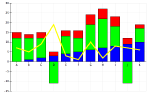
Most of today I've been messing with getting the secondary Y axis on the BKSimpleLineGraphApplet in BKit to work with an additional list of the columns of data for the secondary axis. Basically, a guy stopped by and asked if it would be possible to make the dual-Y axis line graph have two lists at the top: one for the primary Y axis and the other for the secondary Y axis. That way, the user could pick what they wanted to plot on the "left" and what they wanted to plot on the "right".

Something like this:

Bogus Double Y Axis Graph

The problem is that I got a lot of it working with just a few additional applet param tags, but there were problems with the selection of the columns of data for the secondary Y axis. I'd say show me the third column, and it'd show me the first. Very odd. I spent quite a while on this until I checked how the BKFixedLineGraphApplet worked -- It had the same problem! This shouldn't be as I wasn't messing with it at all. So there had to be a low-level issue in the BKBaseGraph when dealing with multiple Y axes.

I started running a lot of tests. What it appears to be is an issue with VantagePoint where no matter what 'Variables' you tell it to put on the secondary Y axis, it's only going to put one of the first two. Essentially taking the column number modulo 2.

Ask for columns 2 and 3 (zero-biased indexes) and you'll get columns 0 and 1. Ask for 1 and 2 and you'll get 1 and 0. Very odd. When I tried out the BKSimpleLienGraphApplet with multiple lines on the secondary Y axis, I saw that I picked up on what VantagePoint had thrown down: the first two columns - no matter what. Wild.

So tomorrow I'm going to have to send Gordon an email saying what I've found and asking if the most recent version he's sending me to fix the problem with multiple Y axes and version 4.6.6 will fix this as well. Because I'm sure not going to deliver this to the users - they wanted the pick lists in order to select what's on each axis. As it is now, it's really too broken to deploy.

Your Disaster is My Picnic

Tuesday, October 21st, 2008

cubeLifeView.gif

I've been dealing with some users in London, and while I haven't worked with them in the past, I hadn't expected what I received either - near paralyzing panic towards any change. It was almost funny, if it weren't so sad, and they have the final sign-off on the deployment of the work I've been doing of late.

They want to think of themselves as "clued-in"... you know, aware of the ins and outs, the whys and wherefores, of everything that's going on. They are, after all, the users, the Big Cheese. You don't get much more important than that. But in reality, they are people, no more, no less, and have limited attention spans, and finite memories, and make just as many mistakes as the rest of us do.

So when one of the users doesn't like the price my injector is sending in, he calls it a "bug". Fair enough, he doesn't know it's acting exactly as it's supposed to - he sees something acting different from what he expects and it's a problem. So I explain it to him. I explain that there are rules that are followed, and why. I explain all this to him so that he understands that it's not a bug, it's a conscience decision. I feel that he may not be happy about the outcome, but at least he knows it's not a mistake.

Or so I thought...

Next he starts talking to other folks about the "bug" he's working on. Sigh... it's not a bug, I explain again, this time to a larger audience, it's a design choice made by the heads of the business, and not to be changed lightly. But it can be changed, if necessary. At this point, I think it's explained well... with examples and reasons for the individual rules.

Sigh...

I see it coming up again. Now I know this guy is not dumb... he's probably just not paying attention to the things I'm saying. Ignoring the details of my messages and just reading what he wants to read -- "You're not going to get it." From there, it's a simple "Oh yes I am!" and we're off to the races.

In other situations, this guy is probably a decent guy. But here and now, he's making me realize that I need to use smaller words, and treat him as I would a child. I have no desire to do this, but it's the only way to keep from wasting both our times. It's working the way it's meant to work, so it's not a "bug"... please stay with me, here, people.

Having a Pretty Decent Day

Thursday, October 16th, 2008

smiley.jpg

It's pretty amazing... I think it was the movie Hellraiser where the "bad human" (as opposed to 'Pinhead') said that the ultimate pleasure was the cessation of ultimate pain. I hate to think of having a good day as the absence of having yet another horrible day, but maybe it's just that easy.

I've been able to do a few things today that have nothing to do with the project that would make 'Pinhead' scream and I have to say it feels very good. I've done a lot of work on that 'puzzle box', but even in doing that, I was able to actually make some progress as opposed to being foiled by users not being specific on what they want, or the docs and tools making it virtually impossible to get what they ask for to work.

So it's a 'smiley' day... now if I can just leave before it turns bad again...

Elegant and Robust Cocoa Initializers

Wednesday, October 15th, 2008

xcode.jpg

I was reading NetNewsWire this morning and one of the feeds had this article on the best way to write Cocoa initializers. I have to say that I didn't know it was possible to have the self re-defined in the super's init method. That certainly does change things.

His default initializer code is elegant and robust:

  - init {
      if (self = [super init]) {
          // set up instance variables and whatever else here
      }
      return self;
  }

or, if you're into trapping errors like I often am doing, you have the 'negative' of this method:

  - init {
      BOOL    error = NO;
 
      if (!error) {
          if ((self = [super init]) == nil) {
              // flag the error and log the problem
              error = YES;
              NSLog(...);
          }
      }
 
      return self;
  }

When I looked back at my initializers for a few projects, I was stunned that I have the exact same code as he did. I thought I had forgotten the self could change, but I hadn't! I'm amazed at myself. This is a wonderful little surprise.

If in doubt, read the page, it's full of good reasons for the checks. Hot Dog! I had it. Sweet.

The Return of an Old Favorite – iTerm 0.9.6.1012

Tuesday, October 14th, 2008

iTerm.jpg

In the days of Mac OS X 10.4 - when the Terminal.app didn't have tabs, I was a big fan of iTerm. But when OS X 10.5 arrived and Terminal.app had tabs and workspaces and seemed to be just as nice, then I stopped using iTerm and went back to strictly using Terminal.app. But it hasn't been perfect. iTerm has much better control of the rendering of the window than Terminal.app does, and while speed is no longer an issue, the ability for iTerm to remove the scroll bar from the window is still a big plus to me.

I've tried several hints off the internet to remove the scroll bars on the Terminal.app windows - even going into Interface Builder and seeing if I can remove them there. Unfortunately, no. It's not something that's supported any more. I can see the reason - the resize handle. If you want to have a resizable window then you need to have the resize widget. If you have that, then it's going to have to exist in the left border or the bottom. So you might as well have it in the left and not make problems for yourself.

Of course, iTerm solves this by simply removing the resize handle with the scollbar. If you're going to be looking at an undecorated window then chances are you're a guy that's going to set the size of the window and leave it. I can see the trade-off. I just wish Apple agreed and put something into Terminal.app to remove the scroll bar and resize widget.

Until then, when I really want to have a terminal window without the scrollbar and resize widget, I'll pull up iTerm. With the new version, it's better than it was, and maybe worth another serious look. After all, for all of 10.3 and 10.4, I used it instead of Terminal.app.

UPDATE: I started playing with it again and I have to say I'm a little disappointed in iTerm - it's memory usage with one window open is more than Terminal.app with nine windows open. While I'd really like to skip the scrollbars, and I will still keep it on my box, it's not worth the memory footprint. Shucks.

Getting Folks to see Their Work Objectively isn’t Easy

Monday, October 13th, 2008

cubeLifeView.gif

Today I had to clean up a mess of code that another developer made. He started with a xmlrpc python server/script that a co-worker wrote, and modified it so that it wasn't really working anymore. I then fixed that up to work, but didn't work on optimizing it for speed. I just needed to get it working first. Then, as I worked on a simpler case to get the speed up, he worked on adding a few features.

I finally got an sub-set implementation that promised to have a solid improvement in the speed and put the changed code into my version of the server. He tried it, but the changes he'd made on his end had been too much to work as-is, and he asked me if I could retrofit my changes into his current code base. I had a look at it and the code was a horrible mess.

This guy is not a trained developer. In fact, his development experience is really scripting for the last several years and that's it. No real significant formal training. He's typical of those developers that hack, print variables, hack some more... copy/paste... never really trying to see what he's doing and try to have a cohesive body of code. But in the end, more times than not, they hack something together that technically works.

I spent over two hours this morning cleaning up his code to get it into a maintainable state. Not adding new features, mind you - just cleaning up the crud. When I told him this was a mess, he got quite defensive, as I expected he would. It's something I've run into time and time again. People know the truth, but they want to deny it because "it works".

Well... it may work, but it's a mess. It's not maintainable. It's going to get worse and worse until at some point it'll be impossible to make a change to it. It's brittle, overly verbose, and lacking any real design. In short, it's a disaster waiting to happen.

I don't enjoy saying it's a mess to people doing the best they can do. But in the end, if they don't see it themselves, someone has to tell them or the overall product will suffer. And suffer badly. It took about twenty minutes but I talked him back from his anger/defensive position, so that he realized that I wasn't commenting about him, only the work. He needed to call in help earlier to minimize the work in this kind of merge. I'm not sure he got it all, but I'm hoping he did... at least enough so that he asks earlier next time.

Interesting Bugs in Implementation of Customer Bits

Monday, October 13th, 2008

SwissJupiter.jpg

I'm working with a vendor's product where they have kindly created the possibility of adding customer-specific fields to each object in the database. It's a nice touch, and if done correctly, it makes the system very flexible and expandable, but if it's done wrong, it can make the system horribly slow and difficult to deal with.

Yes... I know... it's easy to see which this one is.

But to the point at hand. Each of these Customer Bits is tagged with a datatype and what object (both type and instance) it belongs to, etc. The interesting thing is how to add a lot of data to the system very fast. If we need to add in the base object and then, say, a dozen of these bits, then we need to do it all very fast - if it's going to be on something like tick processing, or trade processing. You get the picture.

So today I learned through the School of Hard Knocks, that when adding these bits to an object, you can add them one of two ways: individually, or in bulk. If you add them in individually, you're basically adding the base object, committing it, and then one by one, adding the bits, and committing each as you go. If you add them in bulk, you're creating the base object and all the bits and then committing just once.

What I learned was that if you take the individual approach, the data you place in the bits doesn't matter - specifically, you can place an empty string in a bit and it's all OK. But if you try to do it in bulk, you get a very cryptic error message that it's clearly tied to the bit you're setting to an empty string.

So it's an easy fix - once you know the problem. Simply don't allow setting bits to empty strings. But you'd think that this shouldn't be a problem in the first place. But there you go thinking again.

UPDATE: I heard from a developer deep in the Vendor's shop and he said that there was a bug report about this already and the answer was to disallow all empty string usage in the bits. That's certainly one way to handle it.

Sometimes Weak but Intelligent Feedback is Just What’s Needed

Friday, October 10th, 2008

SwissJupiter.jpg

I was monitoring one of my price injectors this morning and several weeks ago I had worked up an interesting little addition to monitor the app that's processing the prices I'm injecting. I worked up the log-based monitoring, and at the time I was a little concerned that it was too loosely coupled, and that we'd get into trouble because of this. Because of this, I worked very hard to try and anticipate a lot of the conditions that might occur, and as of this morning, I'm very glad to say the efforts have certainly paid off.

Sometimes, it's good to be loosely coupled. I had no real choice, but even if I had, this was a vendor's closed package and what was I really going to do? I have done pretty much all I can. In this case, it was really thinking about what might happen that did the trick. I can see that my app detects that their app is frozen and simply stops sending. I can see it detect that the app has been restarted and starts sending again. Little things, I know, but it's going to make it possible to have my app proactively restart theirs.

That would be a great kick in the pants, wouldn't it? "Hey guys... your app freezes on me -- a lot, so I put in code to detect it and restart it. You might want to work on that stability someday." Man, that would be s...w...e...e...t.

It's just what the doctor ordered.